On this page
- What this checker actually measures
- How the tool counts words and phrases
- Stop words and the two-word phrase option
- Reading a density report honestly
- A worked example
- Editing for clarity without stripping your keywords
- Common mistakes and misconceptions
- Who this tool is for
- Where this tool stops
- Single words vs. bigrams vs. trigrams: choosing the right granularity
- Semantic topic coverage vs. mechanical repetition
- Pre-publish editorial QA workflow: title, intro, headings, and body
- Edge cases: acronyms, hyphenated compounds, and brand vocabulary
- Sources and technical references
What this checker actually measures
This tool takes a block of text and reports which words and short phrases appear most often, how often each one appears, and what share of the document it represents. A term that shows up ten times in a thousand-word article has a density of one percent. A term that shows up fifty times in the same article has a density of five percent. Those two numbers tell very different stories about how the draft reads.
The tool also counts words, characters, and sentences, and estimates how long a reader would spend on the page. Those figures are useful context for the density report. A five percent density is a very different signal in a two-hundred-word product blurb than in a three-thousand-word guide. The length and the purpose of the writing change how the same density figure should be read.
Everything happens on your device. The text you paste is never uploaded, and no server processes the content. You can paste client documents, unannounced pricing copy, or a draft you are not ready to share, and nothing leaves the tab.
How the tool counts words and phrases
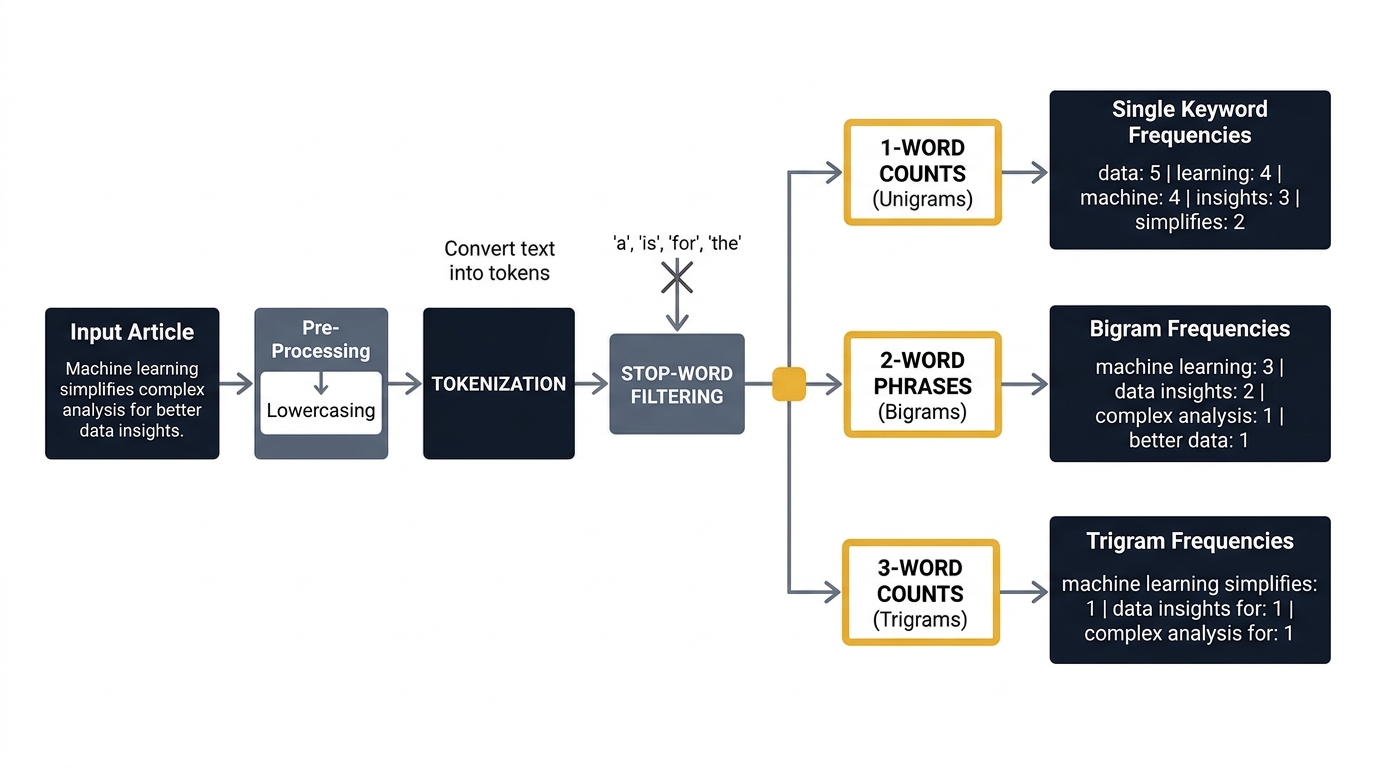
The first thing the tool does is tokenize the text. It reads the input and splits it into individual terms. The rule it uses is simple and readable: a term starts with a letter or a number, and it continues while the next character is also a letter, a number, or one of a small set of internal markers such as an apostrophe or a hyphen. That means contractions like "don't" stay together as one term, and compounds like "client-ready" also stay together. Punctuation such as commas, full stops, and quotation marks ends a term and is not counted.
Once the text is split, the tool lowercases each term so that "Invoice", "invoice", and "INVOICE" are all treated as the same word. It then counts how many times each term appears. When the two-word phrase option is enabled, it also walks through the list a second time and records every adjacent pair of terms as a phrase. So "invoice template" and "template design" would each be recorded separately, even when they appear in the same sentence.
Finally, the tool sorts the terms by frequency, keeps the top twenty-five, and calculates the density of each one. Density is the term count divided by the total word count, expressed as a percentage. For a phrase, the count is divided by the same total word count, so a two-word phrase that appears ten times in a thousand-word document shows a density of one percent, even though it consumed twenty words of the document.
Stop words and the two-word phrase option
The stop-word option controls whether the tool removes a fixed list of small grammatical words before it counts. That list includes articles, prepositions, pronouns, and common conjunctions: the, a, an, and, or, of, to, in, on, with, is, was, it, this, and so on. Those words are essential to English grammar, but they appear in every piece of writing at roughly the same rate. Leaving them in the report tends to bury the terms you actually want to see under a wall of articles and prepositions.
Turning the stop-word option off can be useful in a few situations. If you are analysing a transcript, studying a specific author's voice, or checking a translation, you may want to see the full picture including the small words. The setting is a filter, not a rule, so the right choice depends on what you are trying to learn from the report.
The two-word phrase option, sometimes called a bigram option, is usually the more revealing of the two settings. A single word can be common for a very general reason: the word "content" appears across many kinds of writing. A pair like "content strategy" is more specific and tells you what the draft is really about. In practice, the phrases are often the most useful rows in the report, and they are the ones to look at first when you are reviewing a topic.
Reading a density report honestly
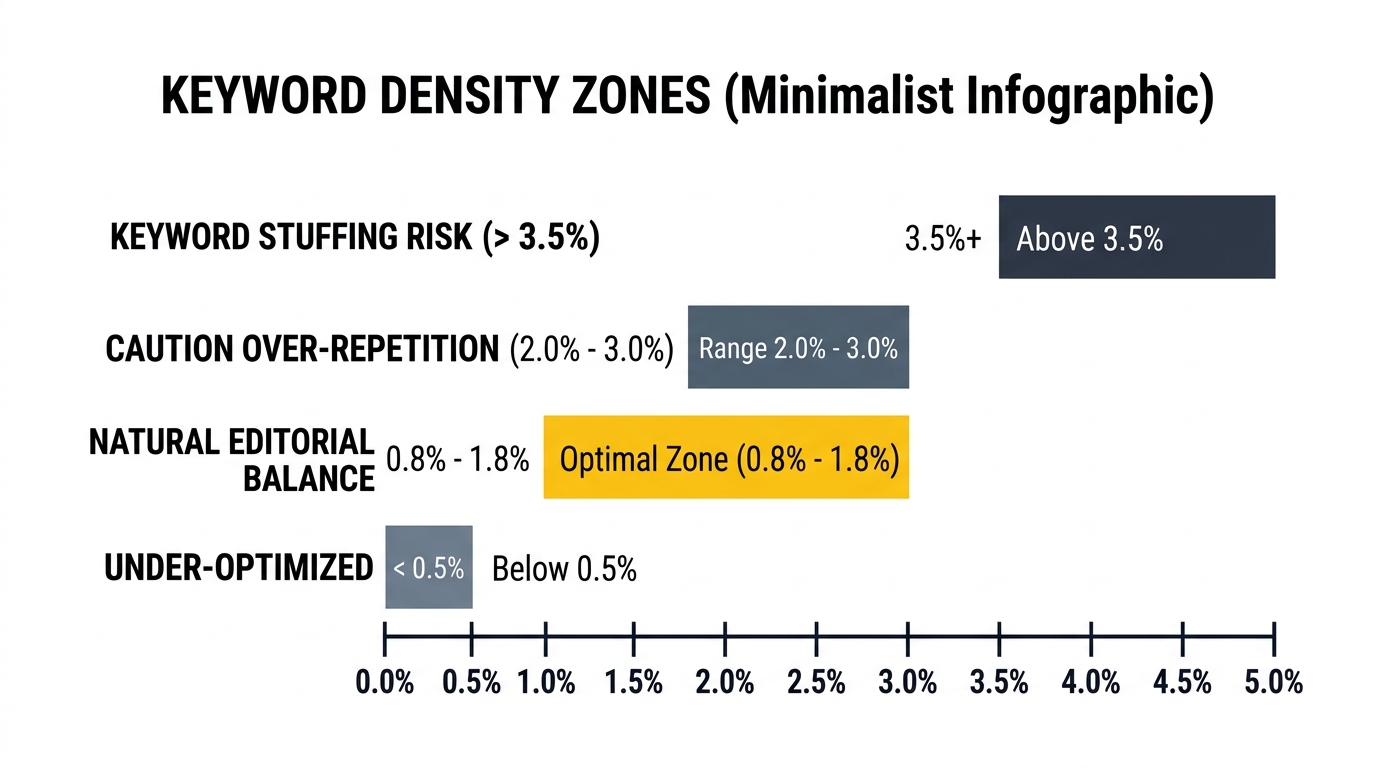
The main value of a density report is that it makes repetition visible. When you are writing, it is easy to use the same noun in every paragraph without noticing. When the terms are sorted by frequency, the pattern becomes obvious. That is the whole point of the tool: not to tell you what density you should have, but to show you what density your draft currently has, so that you can decide whether that matches how you want the page to read.
There is no universal ideal target. A hundred-word product blurb about a wireless earbud will naturally use the word "earbud" many times, and a two percent density would be unremarkable. A three-thousand-word guide to freelance invoicing will use the word "invoice" more often in absolute terms but with a much lower density. Both can be well-written. What matters is whether the repetition serves the reader or gets in the way.
As a rough guide, terms between one and three percent are usually in a natural range for a well-focused page. Terms above three percent are worth reading carefully: the word may be doing useful work, or the draft may be leaning on it too heavily. Terms above five percent almost always indicate mechanical repetition, and the sentences around them usually read awkwardly. But these are editorial signals, not rules. The right move is always to open the draft, find the sentences where the term appears, and read them as a visitor would.
A useful habit. When the report shows a high-density term, do not start by deleting it. Start by reading the five or six sentences where it appears. If the sentences sound natural, keep them. If two or three of them repeat the same idea in slightly different words, that is the moment to rewrite for clarity. Density is a diagnostic, not a target.
A worked example
Suppose a freelance writer has drafted a seven-hundred-word guide called "How to choose an invoice template for your small business". She pastes it into the checker with stop words excluded and phrases enabled.
The report shows that "invoice" appears eighteen times, or about two point six percent. "Template" appears fifteen times, about two point one percent. "Client" appears nine times, about one point three percent. The two-word phrase "invoice template" appears eleven times, or about one point six percent. The two-word phrase "small business" appears seven times, about one percent. All other terms sit well under one percent.
Reading these numbers, the writer can see that the two focus terms, "invoice" and "template", dominate the draft as expected for a page with that title. The phrase "invoice template" is not extreme. The report does not indicate a problem. What it does is confirm that the page is on-topic and that the copy does not wander. That is a useful check, especially for a client piece where the writer needs to justify the vocabulary choices.
Now suppose the same writer has drafted a four-hundred-word product page for a new type of reusable coffee filter. The report shows the brand name "Brewloop" appearing twenty-two times, or about five point five percent. That is high. Reading the draft, the writer notices that the brand name appears in almost every sentence, including sentences where the natural subject would be "the filter" or "the cup". Rewriting about half of those occurrences to use the generic term produces a draft that reads far more easily and still mentions the brand name an appropriate number of times. The density report did its job: it pointed to a specific habit that the writer could correct.
Editing for clarity without stripping your keywords
The temptation when a density figure looks high is to remove the term everywhere it appears. That approach usually makes the draft worse. The word is often there because it names the thing the page is about. Removing it produces vague sentences that use "this" and "it" and force the reader to work out what is being discussed. The point of a density review is not to punish the term; it is to make sure the term is doing useful work each time it appears.
A better approach is to look for two things in the sentences around a high-density term. The first is whether the term is necessary in that sentence. If the sentence would read cleanly with a pronoun or a different noun, replace it. The second is whether the surrounding vocabulary varies. A draft that talks about invoices, bills, statements, receipts, and client documents reads more naturally than one that says invoice every time, even when the underlying meaning is similar.
Rewriting for clarity is not the same as rewriting for a lower number. A change that improves how a paragraph reads is worth making even if it does not move the density figure. A change that only serves to lower the number, without improving the writing, is usually a mistake. Keep the reader in mind and the numbers will take care of themselves.
Common mistakes and misconceptions
Treating density as a ranking target. Modern search systems evaluate whether a page answers the query helpfully, not whether a specific phrase appears a certain number of times. Chasing a percentage produces stilted copy and rarely helps visibility.
Assuming a low number means good writing. A draft can have very low density and still read poorly if it is vague, repetitive in structure, or missing the substance a reader came for. The density figure is one signal among many.
Ignoring the length of the document. A five percent density in a two-hundred-word blurb is normal. The same percentage in a five-thousand-word guide is a serious warning. Always read the density figure alongside the total word count.
Deleting the term everywhere. If the term names the subject of the page, its presence is expected. The goal is to make each occurrence useful, not to remove the term entirely.
Comparing across different tools. Different tools tokenize text differently. Hyphenated compounds, contractions, numbers, and punctuation all get treated differently by different checkers. Small differences between tools are expected and are not a sign that one is wrong.
Ignoring the phrases. The single-word report is useful, but the phrase report is often more revealing. A common phrase can point to a repeated idea that the single-word count misses.
Who this tool is for
The checker is most useful for writers who want a fast, private review of a draft before they publish. Bloggers can use it to confirm that their main topic is present and that no single term dominates too heavily. Product teams can check that a landing page reads naturally rather than repeating the product name in every paragraph. Students can use it to check the vocabulary variety of a long essay. Editors can use it to spot patterns that a writer may have fallen into without noticing.
The tool is also useful for non-native English writers who want to see which terms they lean on most often. Seeing the top-five list is often enough to identify a favourite noun or verb and to look for alternatives in a few places. That is a small change that can noticeably improve how a passage reads.
Because everything runs locally, the tool is safe to use on client work, unpublished pricing copy, internal drafts, and anything else you would not want to paste into a cloud service. Your text stays in your tab.
Where this tool stops
This checker produces an editorial estimate, not a score. It converts a block of text into term counts and density percentages, and it uses a practical tokenizer that works well for languages that separate words with spaces. It does not evaluate whether the writing is accurate, well-argued, original, or useful to a reader. It does not know the target audience, the subject, or the purpose of the page, and it cannot tell you whether a specific density is right for your project.
It also does not handle every language equally well. Languages without spaces between words, such as Chinese or Japanese, need a different segmentation step, and the counts here will not be reliable for that content. Hyphenated compounds, contractions, and acronyms are handled with sensible defaults, but they are defaults, and other tools may count them differently.
Use this tool to notice patterns in your own writing and to make sure the vocabulary serves the reader. Then take the draft, read it out loud in a few places, and make the final call with your own ear. The tool shows you the shape of the draft. The judgement about whether the shape works belongs to the writer.
Single words vs. bigrams vs. trigrams: choosing the right granularity
Looking only at single-word frequency misses half the editorial picture because individual English words carry wildly different meanings depending on their neighbours. The word rate might mean an interest rate on a bank page, a shipping rate in logistics, a freelance billing rate, or a frame rate in video editing. Pairing words into adjacent two-word phrases (bigrams) anchors intent immediately: conversion rate, shipping rate, and heart rate never collide in a bigram table even when single-word frequency clumps them together.
Three-word phrases (trigrams) behave very differently from single words and bigrams in an editorial audit. In a natural 1,500-word guide, even your central topic seldom appears verbatim as a three-word string more than four or five times unless you force it into every subheading. When an author repeats an exact four-word or five-word search phrase ten times across a single page—such as repeating "best project management software" at the start of every paragraph—trigram repetition triggers immediate reader fatigue and signals keyword stuffing.
- Audit single words (unigrams) for topic drift: Your top five content nouns should name the subject directly. If generic verbs or transition adverbs outrank subject nouns, your draft is padded with conversational filler instead of concrete facts.
- Audit two-word phrases (bigrams) for reader intent: Check whether the highest-frequency bigrams reflect the actual questions readers want answered, such as "tax deduction", "calorie deficit", or "meta description", rather than boilerplate habits like "important thing" or "different ways".
- Use manual spot-checks for longer modifiers: Three-word and four-word buying modifiers belong cleanly in your title tag, main H1 heading, and one natural summary sentence—not duplicated artificially in every section break.
When polishing tightly constrained snippets such as storefront listings or snippet headlines, combine this phrase check with our SEO Meta Title & Description Generator so your SERP preview stays sharp without cramming repetitive phrasing into 155 characters.
Semantic topic coverage vs. mechanical repetition
Modern search retrieval evaluates topical depth through co-occurring concepts, entities, and answer completeness rather than counting exact-match keyword occurrences. An authoritative guide explaining how to price freelance services will naturally contain terms such as billable utilization, retainer agreement, tax reserve, scope creep, and effective hourly rate—even if the exact phrase "freelance pricing" only appears six times in 1,800 words.
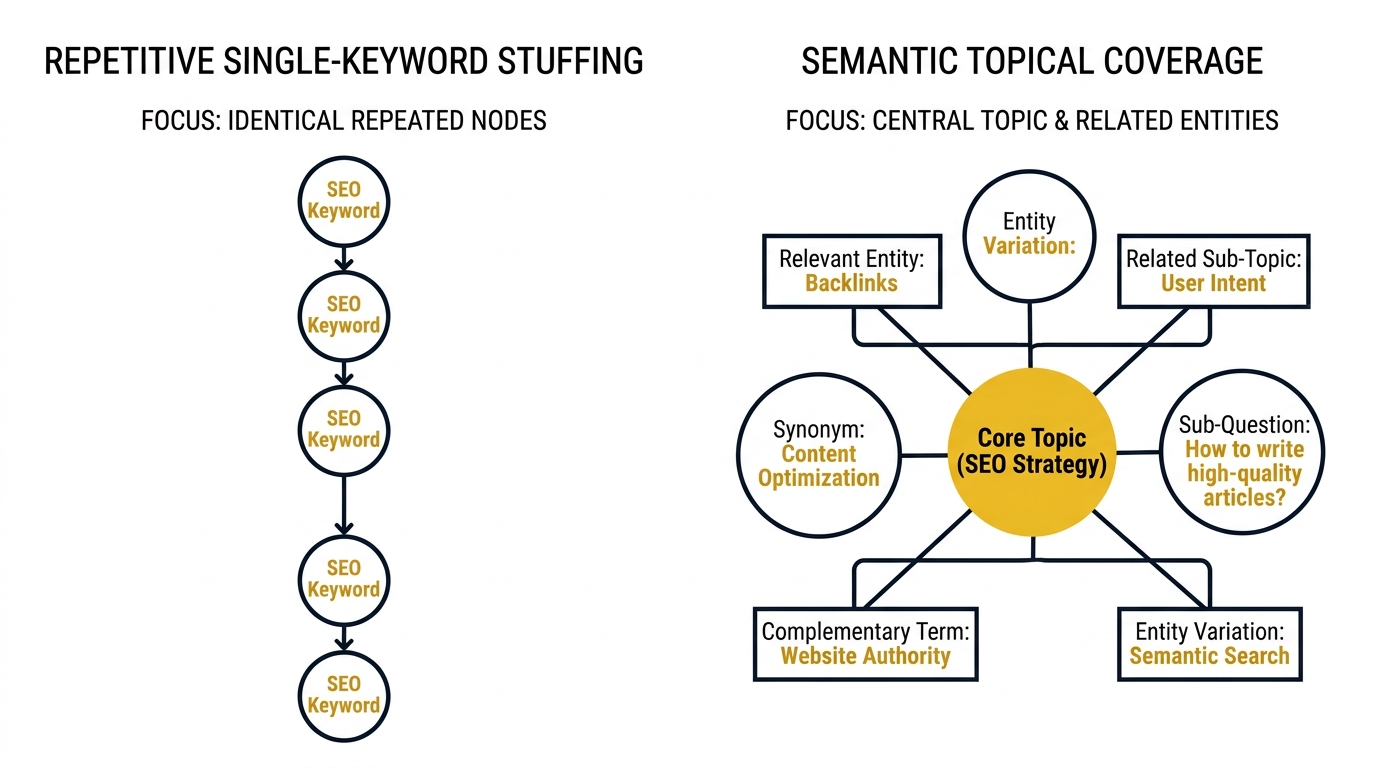
Notice how the diagnostic table changes once you adopt a semantic mindset. Instead of pushing a single keyword higher, you inspect the tail of your frequency distribution between 0.3 percent and 1.2 percent. Ask four practical editing questions on every long-form draft:
- Are key subtopics under-represented? If you wrote an article on small-business bookkeeping and words like reconciliation, receipt, or cash flow appear zero times, your explanation likely skips steps readers expect.
- Did pronouns drop too low or climb too high? Excessive reliance on vague words like "this solution" or "the method" forces readers to look back two paragraphs to understand which noun you meant, hurting comprehension.
- Are adjacent sentences colliding on the exact same root word? Reading the 3+ percent flags helps you merge two choppy sentences mentioning a noun three times into one crisp sentence using clean pronouns or specific synonyms.
- Is reading pacing steady from intro to conclusion? Long technical prose benefits from running a Reading Time & Word Count check or condensing bloated opening summaries with the AI Text Summarizer before auditing density.
Pre-publish editorial QA workflow: title, intro, headings, and body
Treating an entire HTML webpage as one soup of words produces misleading percentages because template chrome—top navigation links, breadcrumb labels, cookie banners, author bios, and footer columns—dilutes the actual article body. Running a clean four-stage QA pass isolates true editorial signals in under three minutes:
Editorial Best Practice: Audit your clean body text separately from your navigation template and HTML tags, then inspect your H1, intro 100 words, and H2 subheadings alongside your frequency report.
- Stage 1 — Isolate pure editorial prose: Copy only the headline, lead paragraph, body paragraphs, lists, and FAQ answers into the checker. Exclude sidebar menus, testimonial carousels, and footer links so template boilerplate never inflates or dilutes counts.
- Stage 2 — Verify the opening 100 words: Readers decide within ten seconds whether a page answers their problem. Ensure your central subject appears naturally in the H1 and within the first two sentences without sounding robotic.
- Stage 3 — Audit heading diversity: Paste just your H2 and H3 subheadings as a separate short check. If eight consecutive subheadings start with the exact same three-word phrase, rewrite half of them as concrete user actions or outcomes.
- Stage 4 — Pair with final formatting and indexing checks: If repeated phrasing stems from awkward sentence structure, rework stiff passages with our AI Paraphrasing Tool, refine e-commerce bullets via the AI Product Description Generator, and verify crawlable canonical URLs inside the XML Sitemap Builder.
Worked revision example: smoothing a rigid draft
Consider how a typical ecommerce manager edits an over-repeated product paragraph flagged at 4.6 percent density for the bigram "ceramic coffee mug". The first draft reads: "This ceramic coffee mug is the best ceramic coffee mug for morning commuters because our ceramic coffee mug keeps drinks hot while every ceramic coffee mug includes a lid." Repeating the noun four times inside one sentence slows comprehension and feels robotic.
Rewriting for clarity replaces three duplicate noun strings with concrete buyer details and natural pronouns: "This insulated ceramic coffee mug is built for morning commuters, pairing a double-wall stoneware core that retains heat for two hours with a splash-resistant silicone travel lid." The revised version preserves the exact primary phrase once, introduces helpful semantic nouns (stoneware, heat retention, commuters, silicone lid), lowers mechanical repetition to 1.4 percent, and actually improves conversion clarity.
Edge cases: acronyms, hyphenated compounds, and brand vocabulary
Automated tokenizers make deterministic splitting choices that occasionally surprise writers working on specialized technical, academic, or commercial documents. Understanding how edge-case punctuation affects reported totals prevents chasing phantom edits:
- Hyphenated compounds: This checker preserves internal hyphens as single joined tokens so terms like "long-tail", "e-commerce", or "year-over-year" count accurately as one semantic unit. If half your draft writes "email" and the other half writes "e-mail", the report splits those occurrences across two rows—a helpful clue to enforce consistent stylebook spelling.
- Acronyms paired with expanded forms: Financial and technical guides often introduce a phrase like "Return on Investment (ROI)" in the opening paragraph and switch to "ROI" thereafter. Both rows reflect the same concept; mentally add their percentages together before deciding whether a term appears too rarely or too frequently.
- Stop-word exceptions in short phrases: Common two-letter and three-letter function words such as "how", "to", "for", and "near" belong on standard stop-word lists. Consequently, enabling Exclude common stop words prevents bigrams like "for the" from clogging the top ten results, though it will also split phrasal expressions like "how-to guide" unless hyphenated or unless you uncheck stop-word exclusion briefly for headline review.
- Quoted UI labels and error messages: Software tutorials frequently quote button labels and menu names repeatedly (such as Settings, Export, or Calculate). High frequency on literal interface labels is functional clarity for readers following steps—do not replace exact button names with vague synonyms just to push a number below 3 percent.
Sources and technical references
Reference Standards & Guidelines
- Unicode Consortium. UAX #29 — Unicode Text Segmentation. unicode.org/reports/tr29
- W3C. HTML Living Standard. html.spec.whatwg.org
- Mozilla Developer Network. Regular Expressions Guide. developer.mozilla.org
- Google Search Central. Creating Helpful Content. developers.google.com/search
- Bing Webmaster Guidelines. Webmaster Guidelines. bing.com/webmasters
- W3C Internationalization. Text Handling Resources. w3.org/International